

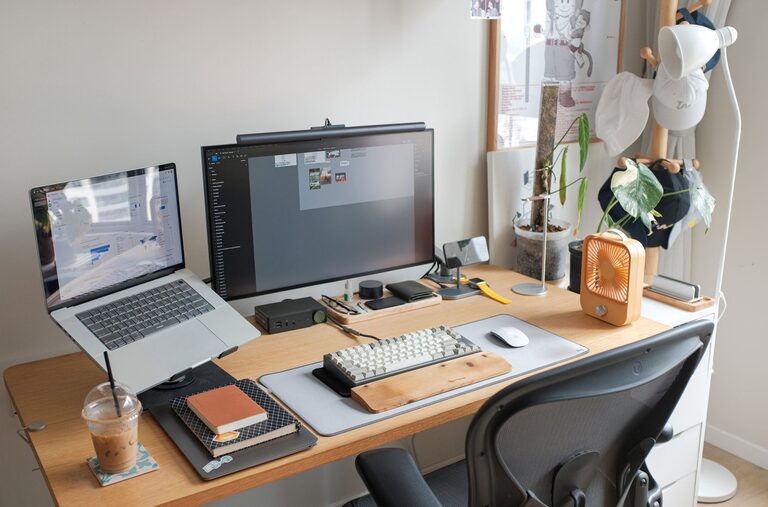
Setting up a home office that supports productivity can make a big difference in your workday. Whether you work remotely full-time or occasionally need a quiet spot to focus, creating an environment that fosters concentration and comfort is key. In this post, we’ll explore practical tips to help you design a workspace that keeps you motivated, organized, and comfortable.
Choose the Right Location
Your home office location plays a crucial role in your productivity. Ideally, pick a space with minimal distractions and good natural light. If possible, choose a quiet room or a corner away from high-traffic areas in your home.
Consider natural light
Natural light can boost your mood and energy levels. Place your desk near a window to take advantage of daylight. If natural light is limited, use soft, daylight-balanced lamps to reduce eye strain.
Ensure privacy
Having some privacy can help you concentrate better. If your space is shared, using room dividers, noise-canceling headphones, or a door you can close will help signal to others when you’re working.
Invest in Comfortable Furniture
Spending hours at a desk requires comfort and proper support. Investing in ergonomic furniture helps prevent discomfort and long-term health issues.
Desk and chair
Choose a desk that fits your work tools and allows enough workspace. Your chair should support your lower back and allow your feet to rest flat on the floor or a footrest. Adjust your chair height so that your elbows are at a 90-degree angle while typing.
Accessories
Consider accessories like monitor stands or laptop risers to keep screens at eye level. This helps maintain good posture and reduces neck strain.
Organize Your Workspace
Keeping your workspace tidy improves focus and efficiency. A cluttered desk can lead to distractions and stress.
Declutter regularly
Make it a habit to clear your desk at the end of each day. Store away papers and items you don’t need immediately.
Use storage solutions
Use shelves, drawers, and organizers to keep supplies within easy reach but out of sight. Label storage containers to find what you need quickly.
Cable management
Tame those cables with clips, ties, or a cable box. A neat setup not only looks better but also reduces frustration caused by tangled cords.
Set Up Technology Efficiently
Reliable technology is essential for a productive home office.
Internet connection
Ensure your internet speed is sufficient for your work needs, especially if you attend virtual meetings or upload/download large files.
Equipment
Invest in quality equipment such as a good headset, webcam, and printer if necessary. Regularly update your software and back up important files.
Peripherals
Use external keyboards and mice if you work on a laptop for extended periods. This can improve comfort and efficiency.
Create a Routine and Boundaries
Working from home means balancing work and personal life.
Set work hours
Establish clear start and end times for your workday. This helps maintain a routine and prevents burnout.
Communicate boundaries
Let family members or housemates know your schedule to minimize interruptions.
Take breaks
Incorporate short breaks throughout your day to stretch, hydrate, and rest your eyes. This boosts productivity and prevents fatigue.
Personalize Your Space
Adding personal touches can make your workspace inviting and motivating.
Plants and decor
Indoor plants improve air quality and add a calming natural element. Choose simple decorations or artwork that inspire you without causing distractions.
Lighting ambiance
Use adjustable lighting to create a comfortable atmosphere. Warm-toned lamps can make the space cozy, while brighter lights can help keep you alert.
Maintain Air Quality and Comfort
A well-ventilated and comfortable room supports focus.
Ventilation
Open windows when possible or use an air purifier to keep the air fresh.
Temperature control
Adjust your thermostat or use fans and heaters to maintain a comfortable temperature.
Use Productivity Tools
Leverage apps and tools to help organize your tasks and schedule.
Task management
Apps like Todoist or Trello help keep track of your to-do lists.
Time tracking
Tools such as Pomodoro timers encourage focused work intervals with scheduled breaks.
Note-taking
Digital notes or planners can help you capture ideas and important information quickly.
—
Creating a home office environment that enhances your productivity involves thoughtful planning and mindful habits. By choosing the right location, investing in comfortable furniture, keeping your space organized, and setting clear routines, you can enjoy a workspace that supports your best work every day. Remember, a productive environment is also a comfortable and personalized one—so make it your own and watch your work flourish.